

Aura Digital Picture Frame – 10.1″ HD Display | Wirecutter’s Best Digital Frame | Text Photos Directly to Your Frame from Anywhere | Quick & Easy Setup Over WiFi – Free Aura App | No ads or fees
$16.99
Related Products



From the brand


TOP-RATED WIFI DIGITAL PHOTO FRAME: Millions of customers are delighted by Aura as the easiest way to share and display photos with loved ones. Recommended by The New York Times/Wirecutter, Wired, and Oprah’s Favorite Things.
FROM YOUR PHONE TO THEIR FRAME: Send photos and videos directly from your phone to an Aura digital picture frame. Invite family and friends to add photos too from anywhere in the world. Free, unlimited storage. No fees.
QUICK & EASY SETUP: Set up in minutes on WiFi and instantly add photos and videos from your phone using the free Aura app. Works with Apple and Android devices.
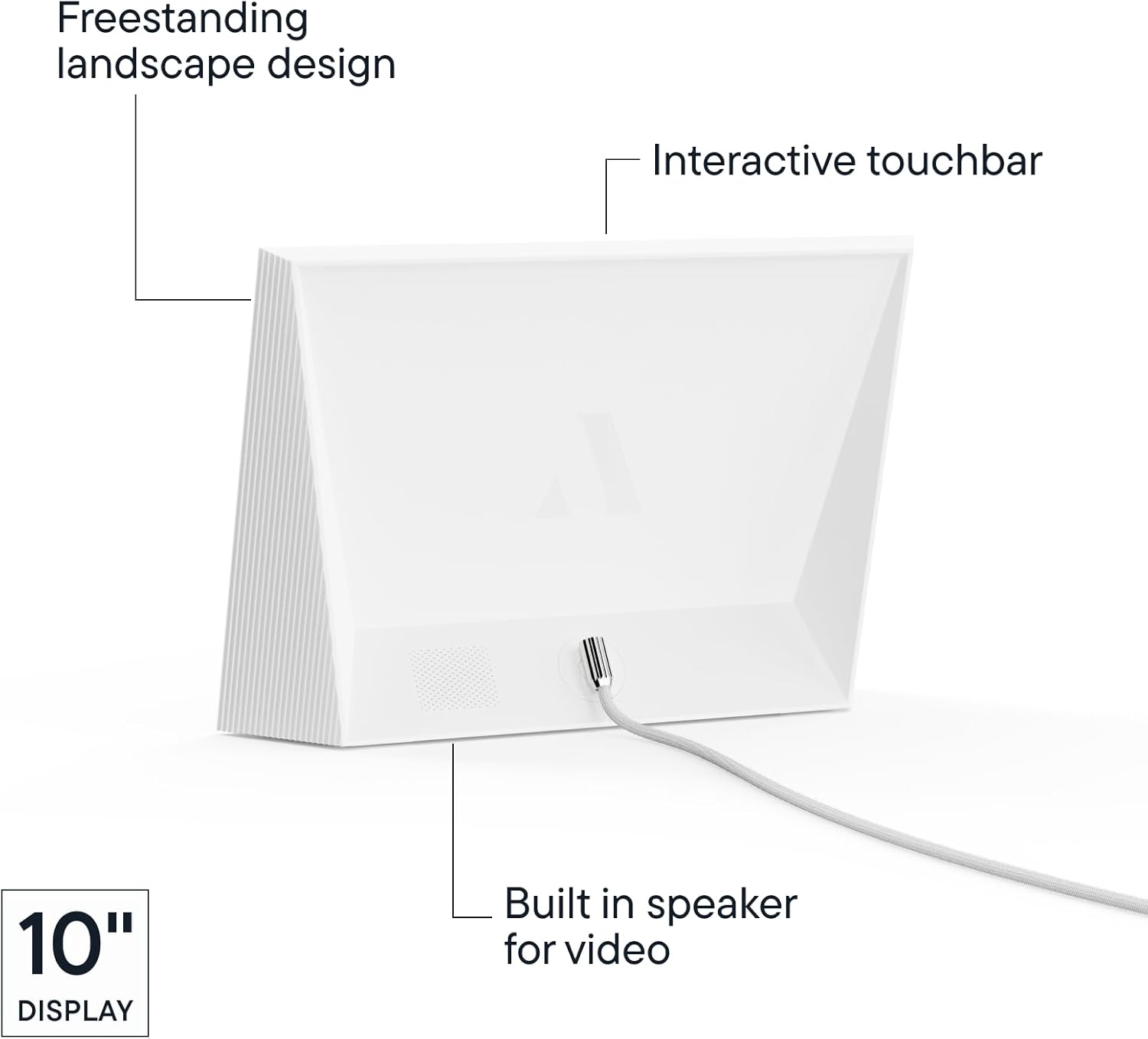
SMART FEATURES: Designed with high-quality materials and a color-calibrated HD display, the Aura Carver landscape frame automatically adjusts screen brightness, manages photo cropping, turns off automatically at night, and more. Includes built-in speaker for video playback.
PERFECT FOR GIFTING: Add photos, videos, and a gift message to this Aura smart frame in the app before sending for a personalized, one-of-a-kind gift.
13 reviews for Aura Digital Picture Frame – 10.1″ HD Display | Wirecutter’s Best Digital Frame | Text Photos Directly to Your Frame from Anywhere | Quick & Easy Setup Over WiFi – Free Aura App | No ads or fees
Add a review

$16.99
Glenn D. Simon –
Quality product and well-designed.
Easy to start up and to invite others to use via the app. Images are sharp and slide show timing can be adjusted. Shuts off when the room goes dark to save energy. Packing is very thoughtful including wall hook hardware and counter support options. Be aware that in portrait configuration, it will crop landscape photos to fit the screen and vice-versa.
Kindle Customer –
Easy to use
Have had one for several years, love it, so am gifting one this Christmas. Absolutely love that it is so easy to set up and to send pictures to. I like that other people can add to my frame! It so much nicer to watch the pictures scroll through, I rarely bothered to pull out an album, now I don’t have to even think about doing that! The upload speed is great and the picture quality is really good, even on the older photos that were converted to digital. Watching it brings back so many memories!
Linda A –
Just what I was looking for!
Sturdy, well made frame with very attractive matt. Screen resolution is very nice and love all the features this frame has. By far the best is the app and user interface. So easy to use and add pictures. Love that you can invite others to enjoy your frame and add to it (with your permission!). Couldn’t be happier.
Kyle Bransky –
Would highly recommend
Rarely do I feel compelled to leave a product review, but this digital picture frame is the perfect gift. It’s high quality, unlimited storage, no subscription and allows you to upload photos without opening the package so you can keep it pristine as a gift. Great product, well worth.
Midnight Shopper –
Easy easy set up!
This frame is awesome!My sis in law purchased one for my mother, and after seeing how easy it was to use I purchased myself one and recently purchased one for my daughter in law. It a wonderful, easy to use, easy to share access easy to set up device. Some of the 1 star ⭐️ reviews reporting difficulties is baffling b/c , if anyone is tech challenged it’s me !
Ben –
Beautiful, Easy to Use, and the Perfect Gift
I absolutely love this digital frame. The picture quality is stunning — bright, crisp, and true to color. Setting it up through the Aura app took just a few minutes, and adding photos is effortless. My whole family can upload pictures remotely, which makes it feel like the frame is constantly coming to life with new memories. The unlimited free storage is a huge plus too. It looks sleek on our shelf and has become a real conversation piece. Perfect for gifts or keeping loved ones close.
kim Little –
Excellent image and color
Sleekly styled low profile design with black edging. The image screen is surrounded by a nice white matte that is sensibly proportioned – neither too narrow nor too wide. Very easy to set up and get going with the ap. Very easy to link to friends and family who want to share their images on your frame. Image quality and color is excellent!
CliffyPop –
Good looking frame optimized for remote use, completely reliant on Aura’s app/cloud service to work
PROS: Easy remote access to photos management for grandma, bright and clear display, balance of features and simplicity, well-considered interface streamlined for remote frame control, works with short videos (see frame rate in CONS below)CONS: Entire system relies completely on manufacturer’s app and cloud service, no internal storage or card ports, narrow use concept may not suit everyone, videos can only play for 30 secs total at about 10 fps, frame control is a bit fiddly and oversensitive to touchSUMMARY: If you don’t mind that his frame is completely dependent on Aura’s app and cloud services, and you want to control a frame for someone else remotely, then this frame works quite well.AURA VS OTHERSI looked for frames that had more flexibility but was daunted by an array of dubious products with the gamut of confounding reviews (“This frame’s every dream come true?” next to “This frame tried to kill me!”) and general user confusion.Mainly, I wanted a frame that could be controlled remotely AND locally with internal storage or SD card ports. This way if the manufacturer tanked, the frame might live on with locally uploaded photos. Unfortunately, all frames seem to rely on apps even if they have internal storage so they would still be useless if the app is gutted. Also, the more flexible the more complex and these products seemed to suffer according to many reviews. The Aura frame seems limited in the right ways to the narrow task at hand: remote management of photo display for someone else.GREAT FOR GRANDMA/PA FAR AWAYI like how it’s possible to set up the frame as a gift with the recipient’s WiFi credentials preset so you can mail it and it’ll automatically work when plugged in at its destination. You can even type a note to appear on screen at launch to greet the recipient. Otherwise, it’s easy to setup one WiFi network and then bring it to another network and reset to work there. Obviously, Aura devs are thinking closely about who’s using this and why with fun and personal touches available.EASY & FLEXIBLE PHOTO UPLOADINGI use Apple iCloud shared folders in iOS Photos app to share photos with family members. There are 900+ photos and videos in there. Aura’s app easily allowed me to select that shared folder as a live source and over a few days added them to its cloud service for access by the frame. This means I can still add photos over time to one place that I’m used to and NOT be forced to upload to iCloud AND Aura’s cloud. In other words, the frame just worked for me. Otherwise, it’s easy to use the app alone for photo management and display. It taps into your folders and photos on your phone so it’s flexile and easy to get the right photos to appear automatically.Happily, I was able to easily pop a special photo into the frame’s stream by simply uploading it in the Aura app and setting it to “Show Now.” My grandma was sitting by her new frame 900 miles away and saw the photo almost instantly as we spoke on the phone. Perfect! It’s also possible to email photos to the frame via a custom address provided by Aura. It’s useful that I can see which image(s) are currently showing on the frame from the app so we can chat on the phone and see the same images together.OTHER USEFUL FEATURESOther nice features are: set timing of slideshow from 15 secs to 24 hours, autoplay videos or not, set speaker volume remotely and locally, remove individual images via app or frame, and auto sleep when lights go out in room. I don’t have multiple frames, but it seems easy to manage multiples with unique settings for each.There’s a simple touch interface on top of the frame that allows next/previous sliding of images, tapping to see more info such as date of image(s), limited control of image/video display (videos that don’t play sound automatically unless tapping the frame is a good choice so it isn’t randoming playing noise in a quiet room), and even remove an image from the stream. It’s fun that grandma can double tap an image to like it with little heart that floats up onscreen as I get a notification in the app showing me the image(s) liked.The minor problem here is that the touch strip on top of the frame is a bit too sensitive and fiddly so that sliding and tapping is delayed/too fast and generally twitchy. It’s not as easy to use as it should be but it’s not terrible and there’s not much to be done with it anyway. The worst part is tapping it to see choices of Cancel, Remove Image, and turning off the frame. Sliding between the options and then tapping to select is genuinely hard. However, the main use of sliding images forward or back works well enough. It seems like Aura chose to go cheap on processing power with the result being a bit of control lag and low frame rate on videos. Not a big deal but still frustrating when computing power is so cheap and available nowadays.
Maria C. –
Excelente definición de imagen, es muy amigable para la carga de fotografías, el único “pero” es que no da la opción de generar álbumes para agrupar / decidir un conjunto de fotografías a mostrar y luego poder cambiar a otro… Fuera de eso es una compra excelente para ver las fotos que de otra manera solo se quedan almacenadas en los dispositivos electrónicos…
Bob –
Bin sehr zufrieden mit dem Rahmen.Wir haben den Aura Carver Luxe für die Großeltern gekauft und haben mittlerweile noch einen zweiten für uns selbst.Im Vergleich wurden mehrere Rahmen mit Frameo Betriebssystem angeschaut.Die größten Unterschiede:- Bildqualität & Anzeigen: Gefällt uns beim Aura besser, vor allem ohne Einstellungen für Helligkeit etc. treffen zu müssen. Bei den anderen Rahmen war die Farbwiedergabe und der Blickwinkel etwas schlechter. Wenn Sie nicht direkt nebeneinander stehen fällt es aber wahrscheinlich kaum auf.- Konzept asynchrone Cloud vs. Rahmen mit Internetverbindung:Mir gefällt das offene Konzept von Frameo eigentlich besser, aber in der Praxis ist Aura komfortabler. An einen Frameo Rahmen können die Bilder nur geschickt werden wenn er gerade online / eingeschaltet ist. Auch kann man in der App nicht sehen welche Bilder noch von anderen Hochgeladen wurden. Im Prinzip werden die Bilder wie per Mail oder Messenger auf den Rahmen geschickt, als Alternative zum übertragen per USB. Bilder löschen funktioniert nur direkt auf dem Rahmen.Bei Aura kann über die App der Rahmen mit allen Bilder verwaltet werden. In der Praxis gefällt uns das deutlich besser, wir können direkt sehen welche Bilder von anderen hochgeladen wurden, können Bilder ausblenden und löschen etc.Die App funktioniert gut (iOS), Fotos können direkt aus der Fotos App an den Rahmen geshared werden. Analog zum Auswählen und verschicken in einem Messenger.Schade ist, dass es keine Desktop App gibt (Nur Upload über Web Oberfläche). Damit ist das Hochladen von Fotos aus der Kamera etwas weniger komfortabel. Ich löse es über import in die iCloud Fotos und dann senden an den Rahmen über das iPhone.
Carli –
I LOVE this so much! Easy to set up and use. Holds unlimited pictures and short video clips. Easily upload from your phone. Perfect for any home. Would make a very thoughtful gift too. I could sit and watch the pictures all day. The quality of the pictures are amazing and it’s such a great way to watch and remember special memories. The app for your phone is very easy to use. Has a sleep mode for when you turn off your lights at night. Very functional and practical.
Fardasefapertre –
Funziona molto bene. Immagini nitide. Possibilità di caricare le foto direttamente dallo smartphone tramite l’app dedicata. Consigliata
YamaMama –
Jag har haft en Aura ram i flera år och ville ge en till min mamma så hon kunde se och skicka bilder på familjen. I år blev det av- så succé!Hon tycker mycket om Aura och vi skickar bilder till varandras ramar dagligen !