

16A Basic Wireless Smart Switch,Wi-Fi Light Switch Compatible with Alexa & Google Home & SmartThings,FCC Certified,No Hub Required Support DIY Module (2 pcs)
$16.99
Related Products


Product description

TUYA Smart Wi-Fi Home Switch Led Light Universal Module DIY Smart Life Wi-Fi Switch Supports 2 Way Control Work with Alexa Google Assistant Smart LifeFunctions:Remote ON/OFF: Turn electrical devices on/off from anywhereApp Support: Free IOS and Android mobile App Smart LifeSync Status: Real time device status provided to AppTiming: Set scheduled/countdown timers to turn on/off at specified timeShare Control: Control your smart home together with your familyScene: Turn on/off a gang of devices one tapSmart Scene: Trigger on/off by temperature, humidity or other environmental conditionsNetwork Support: Control electrical devices over Wi-Fi or 2/3/4G mobile networkVoice Control: Works perfectly with Amazon Alexa
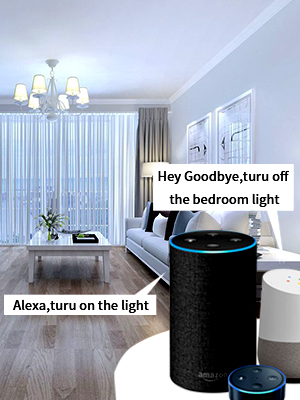
Voice control
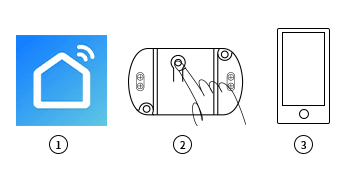 SMART LIFE APP Pairing Instruction
Download “SMART LIFE” app in APP Store for iOS or in Google play for Android.Cut off the power before installing the device. Then power it up after completing the installation.Press the button for 6 seconds until the LED indicator on it flashes quickly.It will auto-search and connect the device.Input home Wi-Fi SSID & password.Name the device to complete.
Works with Amazon Alexa & Google Home Assistant
Control your device through your voice
1.Download Amazon Alexa APP2. Enter your SMART LIFE account and log in.3. All the devices supported by voice control under your account display on Alexa App or Google Home App.4. Name the devices to complete.5. Now, control the connected devices with voice commands.“Alexa, turn on the light.”“Hey Google, turn off the bedroom light.”……
Technical Details
Name Tuya Smart Switch Manufacturer RODOT Part Number KR2201WB Material ABS Voltage AC110V /220V Wattage 2200 watts Wireless networking WIFI (802.11 B/G/N2.4GHZ) APP Smart Life
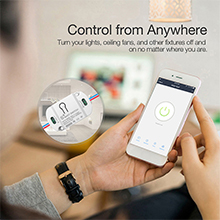
App Remote Control
Via free Smart Life or TUYA Smart App. You can download the iOS version in App Store and the Android version in Google Play. The App Smart Life enables you to control your devices easily .
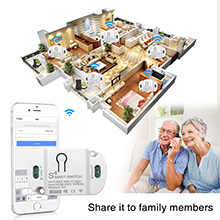
Share Control
Share control of your home appliances to your family or friends so that they can also control the devices remotely.
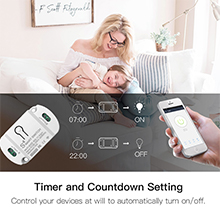
Timer & Schedule
Another feature available if to set timing schedules for the appliances, which can include countdown, scheduled on/off .It’s simple, giving you one less thing to worry about in your busy life. Control your devices at will to automatically turn on/off.

LAN Control
Use LAN control function to turn on/off the device when there is no Wi-Fi network.
HOW TO CONNECT THE DEVICE TO WI-FI ?

DOWNLOAD SMART LIFE APP Power on the smart switch and make sure that the phone is connected to the Wi-Fi network in the 2.4GHz frequency band; turn on the phone’s Bluetooth. Make sure that the device, mobile phone, and router are close to each other. Download and open the App:Search for “Smart Life” in the App Store or scan the code below to download and install the App;For the first download and use, please click the “Create New Account” button to register;If you already have an account, click the “Log in with an existing account” button.
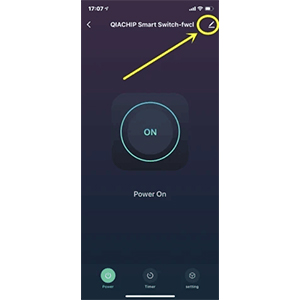
ADD DEVICE TO “Smart life” APP Reset the smart switch: Press and hold the button on the smart switch for more than 6 seconds until the LED indicator on it flashes quickly.Open the “Smart Life” APP, click the “+” in the upper right corner to enter the device addition page, and then select “Auto Scan” (please turn on the Bluetooth function of the phone before performing this operation) to start searching for nearby devices to be added. After discovering the device to be added , The icon and name of the device will appear on the APP page or a prompt page will pop up, then please follow the APP prompts to add the device.After the smart switch is successfully connected to Wi-Fi, you can see the newly added device on the home page of the Smart Life APP.
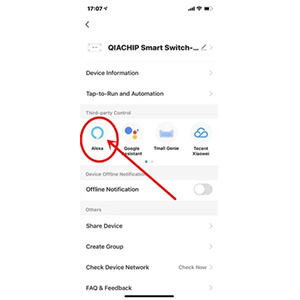
HOW TO CONNECT TO THIRD-PARTY APPLICATIONS SUCH AS ALEXA AND GOOGLE ASSISTANT? When using a third-party smart speaker to connect, you first need to download the third-party APP and register an account, such as Amazon Alexa; then add the device in the “Smart Life APP”, open the device control page, click the upper right corner (see the picture below), and then Jump to the device information page, where you can change the name of the device, and you can see the details of the third-party controlled APP supported by the device, select the APP you need to connect, such as Alexa, click the icon to enter the binding interface, and then press The page prompts the operation.
Add to Cart
Add to Cart
Add to Cart
Add to Cart
Add to Cart
Add to Cart
Customer Reviews
4.4 out of 5 stars 221
3.6 out of 5 stars 10
3.6 out of 5 stars 23
4.0 out of 5 stars 2
4.0 out of 5 stars 34
4.0 out of 5 stars 2
Price
$10.99$10.99 $15.99$15.99 $19.99$19.99 $16.99$16.99 $15.99$15.99 $10.99$10.99
Max. Current
10 a 16 a 16 A 16a 30a 16a
Max. Power
2200 W 3520 W 3520 W 3520W 6600 3520W
Support 2.4G Remote Control
✓
✓
✓
✓
✓
✓
APP
eWeLink eWeLink eWeLink eWeLink eWeLink eWeLink
Compatible with Alexa Echo
✓
✓
✓
no data
✓
✓
Product Dimensions : 2.56 x 1.57 x 0.91 inches; 0.01 ounces
Item model number : 1
Date First Available : June 28, 2021
Manufacturer : RODOT
ASIN : B0982W56ZF
Best Sellers Rank: #63,990 in Tools & Home Improvement (See Top 100 in Tools & Home Improvement) #240 in Electrical Outlet Switches
Customer Reviews: 4.4 4.4 out of 5 stars (433) var dpAcrHasRegisteredArcLinkClickAction; P.when(‘A’, ‘ready’).execute(function(A) { if (dpAcrHasRegisteredArcLinkClickAction !== true) { dpAcrHasRegisteredArcLinkClickAction = true; A.declarative( ‘acrLink-click-metrics’, ‘click’, { “allowLinkDefault”: true }, function (event) { if (window.ue) { ue.count(“acrLinkClickCount”, (ue.count(“acrLinkClickCount”) || 0) + 1); } } ); } }); P.when(‘A’, ‘cf’).execute(function(A) { A.declarative(‘acrStarsLink-click-metrics’, ‘click’, { “allowLinkDefault” : true }, function(event){ if(window.ue) { ue.count(“acrStarsLinkWithPopoverClickCount”, (ue.count(“acrStarsLinkWithPopoverClickCount”) || 0) + 1); } }); });
【App Remote Control】RODOT Switch transmits data to a cloud platform through the Wi-Fi Router, which enables you to remotely control the connected appliances, via free Smart Life or TUYA Smart App.You can download the iOS version in App Store and the Android version in Google Play.The App Smart Life enables you to control your devices easily .
Timer & Schedule】Timer and Countdown Setting . Another feature available if to set timing schedules for the appliances, which can include countdown, scheduled on/off .It’s simple,giving you one less thing to worry about in your busy life.Control your devices at will to automatically turn on/off.
【Hands-free Voice Control 】Free hands via easy voice control with Alexa and Googel Home.Compatible with Alexa & Google Home, the smart switch allows you to control lights on/off with your voice.
【WIDELY USE】: RODOT Wifi Smart Switch is widely applicable and can be applied to 97% household appliances and lamps, as long as the phone has network , users can remotely turn the connected home appliance on/off from anywhere at any time.
【Universal DIY】Compatible with any household appliances (100-240V AC, max current 16A, max wattage 3500W). The small module has DIY capability for users with basic electrician knowledge.
13 reviews for 16A Basic Wireless Smart Switch,Wi-Fi Light Switch Compatible with Alexa & Google Home & SmartThings,FCC Certified,No Hub Required Support DIY Module (2 pcs)
Add a review

$16.99
Alonso Rodriguez –
Worked as described
I used for garage door and work perfectly
hi –
12ga stranded wire works!
Happy I found these. FYI 12ga stranded wire does fit. I used the pigtail from an old GFCI breaker.
Joe Turczak –
Working great after a month so far!
These worked great. I wired them into 2 floor lamps that are always a pain for me to get to cause I have them in weird spots like behind my couch and a working area. So they’re not easy to reach to turn on and off, so these make them automatic and I can use Alexa or the app to turn them on and off.I plan on buying more!
Cristian Mejia –
Good choice
It worked perfectly for my needs. I used it for a water pump, and since it’s small, I could fit it inside the electrical panel. The only downside is that the socket is tiny and you can’t fit an AWG 12 gauge cable, must be AWG14 or bellow,
A.I. –
Reliable and Easy-to-Use Wireless Smart Switch
I’m happy to have found this Basic Wireless Smart Switch—it’s a reliable, Wi-Fi-connected solution that made controlling my attic fan effortless. Installation was straightforward, with clear instructions, and it connected to my Wi-Fi network without any issues.The switch integrates smoothly with my smart home setup, allowing me to turn the fan on and off remotely through the app. The responsiveness is excellent, with no noticeable lag, and I appreciate the ability to set schedules and automation rules for better energy efficiency.The build quality feels solid for the price, and after months of use, it continues to perform flawlessly. If you’re looking for an affordable, no-fuss smart switch to control appliances like fans, lights, or other devices, this is a great option. Highly recommended for its reliability, ease of installation, and seamless operation!
TRCALI –
Worked surprising well.
I have replaced my old mechanical timer in the garage with this unit. I set up the unit close to the router to ensure it had a connection to Wifi. I then moved it to the garage for installation. The signal was strong, and it worked very well. Setting up the unit on the software was relatively easy if you have experience with such devices. It might take a novice a bit longer to figure it out. Once I got it set up, I added automation to turn the lights on and off to a required timing, and connected it to Alexa so I could turn on the device as needed. The most challenging part of the setup was turning off the Wifi 5G signal and only having the 2.4G available to sync the device. It took a little investigation on the web, and I don’t know why all service providers don’t make that easier to do. These devices would support both protocol frequencies. Anyway, that is not this device’s issue. I recommend them. Side note… If you put this device into a wiring box, it can be tight. Be careful that the reset button does not press when putting the cover plate on. Found that out the hard way.
Peter –
Excellent Quality Smart Switches – Working Perfectly – Easy Alexa Interface
I installed these switches inline with circuit breakers feeding my shop’s main and back room lights. It was an easy install and my Alexa APP now turns on the whole shop and is working perfectly. BTW: Installing and paring with Alexa is like any other. Super easy.This switch is small and easy to tuck into a wall space or electrical box, etc…. The build quality feels and looks excellent. Easy connectivity and operates COOL.Great value for the money – I am buying MORE – Highly Recommended.
Ovanes Markaryan –
Short Lifespan
Purchased 3/2024 for Towel warmer management: 2x a day turn it on/off based on timer. 10/2025 this thing broke. Have to turn off electricity on the panel to reset it. It works for a day then and isn’t reachable again. Super annoying that I have to reinstall something better than this again.
Alfredo villa –
Es justo lo que esperaba, fácil de instalar y configurar
Andres G. –
Muy bueno solo que la frecuencia no es 433mhz, es 433.92mhz y yo lo ocupaba en 433.00mhz
Moises Contreras –
Funcionan excelente, y se sincronizan automaticamente aunque pierdan energia.
ISMAEL SAHAGUN MORALES –
Son muy fácil de instala y programar con la App. Smart life
Gerardo Sánchez –
Pocos dispositivos se conectan tan rápido, tamaño ideal gran valor por tu dinero. Muy recomendables.