
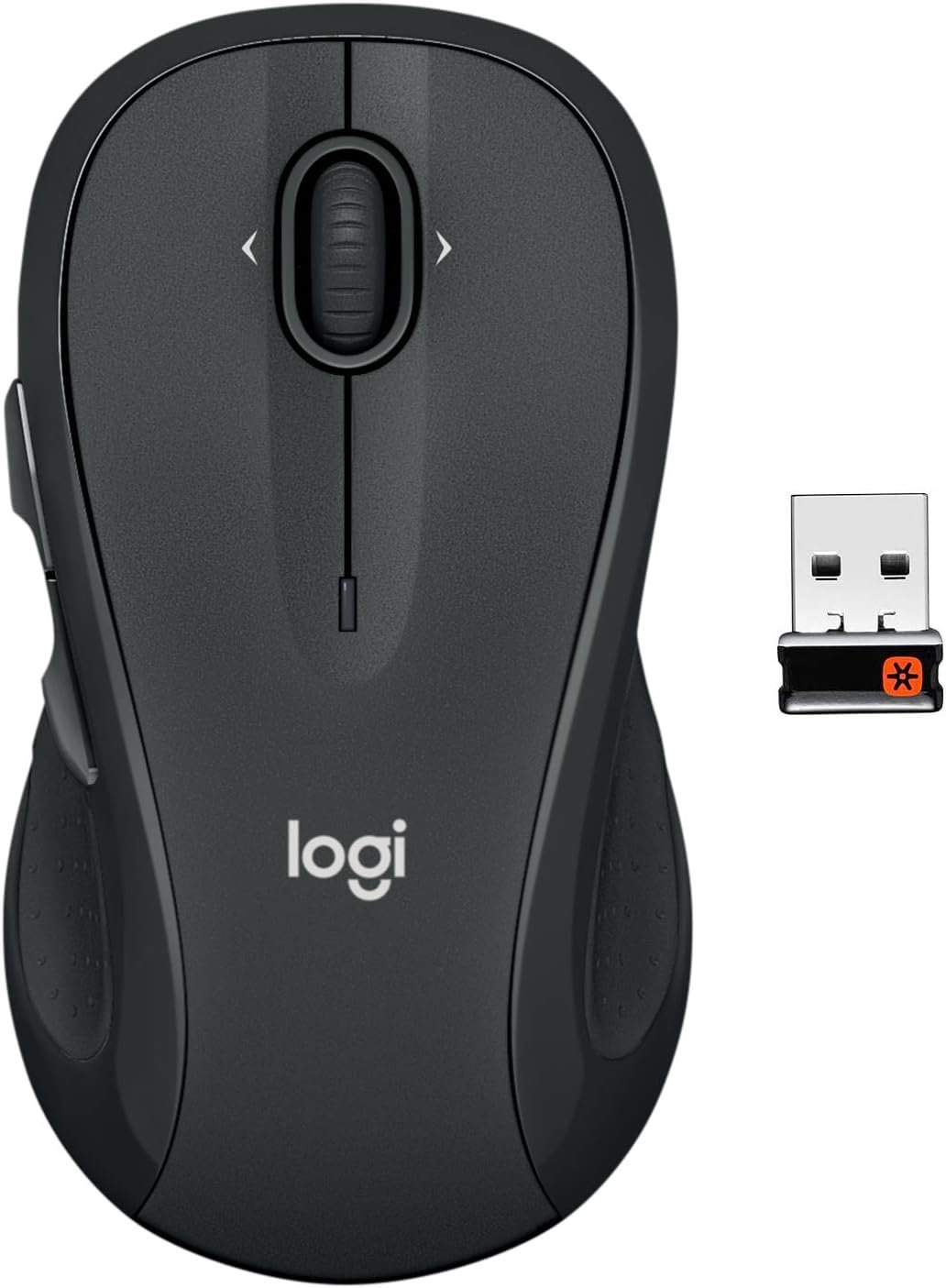
Logitech M510 Wireless Mouse, Mouse for Laptop and PC with USB Unifying Receiver, Programmable Buttons – Graphite
$24.60
Related Products


The full-size Logitech Wireless Mouse M510 gives you more control, so you can do more with your laptop mouse. This Logitech ergonomic mouse features a contoured shape with soft rubber grips that give you the support you need for all-day comfort. Flipping through photo albums and Web pages is a breeze, for right-handers or left – this wireless computer mouse has three standard buttons plus Back/Forward buttons that you can also program to switch applications, go full screen and more. And side-to-side scrolling plus zoom gives you the power to scroll horizontally and vertically through your music library, maps and Facebook feeds, and zoom in and out of photos and do more, faster. The USB unifying receiver remains plugged into your desktop or laptop, eliminating the need for repeated removal or insertion. 2 years of battery life practically eliminates the need to replace batteries (2 AA batteries). The Logitech Mouse M510 is compatible with Windows, Chrome and Linux operating systems.
2 years of battery life practically eliminates the need to replace batteries. The On/Off switch helps conserve power and the smart sleep mode helps extend battery life. A wireless mouse for laptop and PC; compatible with Windows, Chrome and Linux
The tiny Logitech USB Unifying receiver stays in your laptop. There’s no need to unplug it when you move around, so there’s less worry of it being lost. Easily add a compatible computer wireless mouse or keyboard to the same wireless receiver
The Logitech M510 graphite wireless laptop mouse comes with a battery indicator light on the top to eliminate surprises
Your hand can relax in comfort hour after hour with this ergonomically designed wireless mouse for PC. Its contoured shape with soft rubber grips, gently curved sides and broad palm area give you the support you need for effortless control all day long
Get the control to do more, faster This Logitech wireless mouse features three standard buttons plus programmable Back/Forward buttons to switch applications, go full screen and more. Side-to-side scrolling and zoom lets you scroll horizontally/vertically
13 reviews for Logitech M510 Wireless Mouse, Mouse for Laptop and PC with USB Unifying Receiver, Programmable Buttons – Graphite
Add a review

$24.60
Barbara P. –
The mouse is fine but the delivery package is NOT
The mouse is reasonably priced and works well. I like that there’s a little compartment for the toggle that goes in the USB port on my computer. The issue I have is with the delivery package. It has a large sticker on it about lithium ion batteries for ABSOLUTELY NO REASON. The mouse takes regular AA batteries. Now, it didn’t help that Amazon did NOT deliver this during the window they said–7 am to 11 am, when I expected to be awake–but while it was still dark out, as evidenced by the delivery photo. This meant that someone walking by (the sidewalk is 3′ from our door) saw the package, especially the lithium ion battery sticker, and stole it, probably thinking it was a computer. I had to get a replacement because of this. So PLEASE, do NOT put stickers on packages about something having lithium ion batteries if there are no lithium ion batteries! And if you’re going to deliver during a particular time frame STICK TO THAT TIME. I chose that time for a good reason! Making sure all of your delivery people ring the doorbell wouldn’t hurt either. Let us know you’re here so we can get our packages before someone else takes them!
ASH –
Perfect everyday mouse for dual setups
Sure — here’s a concise version perfect for an Amazon review:⸻⭐️⭐️⭐️⭐️⭐️ Perfect everyday mouse for dual setupsThis Logitech mouse fits perfectly in the palm — super comfortable for long use. The side forward/back buttons are really handy for browsing and multitasking. What I love most is the Unifying feature: I use the same USB receiver to connect my home and office setups without re-pairing or switching dongles. Smooth, reliable, and efficient — exactly what I needed.
RogerK –
Excellent mouse and more!
The Logitech M510 wireless mouse is a very comfortable and smoothly performing mouse. It is a full size mouse that nicely fills up the palm of the hand. The weight of the mouse is “just right”. The mouse body is symmetrical so that will be equally comfortable for left or right handed people.The mouse movement and scroll wheel work perfectly smoothly with no jump or jitter. The mouse optical performance is very robust on poor surfaces. It works equally well on a mousepad, a bare table, on a pants leg, back of a book, even the palm of the hand. It tracks perfectly on almost any surface (which many other mouse brands have trouble with).These mice use the Logitech “Unifying” USB mini receiver which can support up to six Logitech devices by itself. If you have a Logitech mouse, keyboard, trackball, etc… they can all operate from the same receiver (saves using up USB ports). Be aware that the unifying receiver ONLY works with Logitech products and that it is NOT Bluetooth or Wi-Fi. Logitech products can be “paired” with the unifying receiver in Windows and MAC (of course) and also in Linux by using the software package called “solaar” (free, open source). The mouse comes pre-paired to the receiver, so it works “out of the box”. If you want to add (up to 5 more devices), you have to pair them yourself.The battery life is awesome. Because I hate leaking batteries, I always use AA lithium cells for everything (including the mouse). My first old Logitech MS-510 mouse that I purchased over three years ago is still working fine on the FIRST batteries that I installed in it (two AA lithium). Since I use it on my desktop the mouse power switch is always left on. It must consume practically no power when not being used.If you use the mouse with a laptop or need to move it from computer to computer, the little unifying receiver can be stored inside the mouse (in a little USB sized slot next to the batteries) to avoid losing it.What follows is some technical information that you can skip if you don’t care.Construction: This mouse is very nicely engineered and can be completely disassembled by removing two little screws inside the battery compartment. No screws hide under the teflon slider pads, so those don’t get damaged if you take the mouse apart. Every component then can be removed simply by sliding or snapping it out. Why take it apart? See next.My personal feeling is that the left and right mouse buttons are too light (i.e. press too easily). The buttons are no lighter than other mice, I just prefer them a bit tighter. To change this, I replace the two little microswitches with Omron Series D2F-01 parts that have a 150 gf actuation force. It takes about twice the pressure to click these switches as compared to the originals. To replace them is super simple: Just unsolder the originals and solder the new ones in place. If you forget which way they go in, the orientation is printed on the PC board.The side “scroll” buttons already use heavier pressure microswitches, so I don’t change these. The “middle button” (pressing the scroll wheel) and the left/right scroll switches (rock the scroll wheel left or right) are a different type of switch that also do not need changing.If you disassemble the mouse, be aware that the little plastic slider for the power switch will be free to fall out when the mouse PC board is removed. If you don’t know this, it’s possible for the slider to silently fall out, never to be seen again.I won’t tell you HOW to unsolder and resolder the button microswitches, because if you don’t know how, you shouldn’t be doing jt in the first place (or get an electronics-knowledgable friend to help). And, of course opening and modifying the mouse will void the warranty!I will give you one important hint: Because the mouse was assembled using RoHS compliant lead free solder, the microswitch solder joints should first be RE-SOLDERED with leaded solder before sucking or wicking the joints clean. This is done to “alloy” the high temperature lead free solder into more manageable leaded solder to avoid burning/ruining the (single sided) PC board.Good luck! This mouse (hacked or not) gets 5 stars and both thumbs up. It works flawlessly, it’s comfortable, battery life is amazing and the price is good (even better when it’s sometimes on sale). Grab one!
Johnny H. –
REALLY GOOD WIRELESS MOUSE FOR WORK AND CASUAL USE
This mouse works great for my job and the fact that it’s wireless is a bonus. The forward and back buttons are very useful to me and I use them daily. The only issue I have with this mouse is that the wheel makes noise as it moves side to side when I’m not using it. I can move the mouse without having my hand near the wheel and it seems to rattle. I have another logictech mouse, different model, that doesn’t make that noise when I move it around. Maybe the one I received has a defect, or maybe it’s a bad internal design for the wheel on this model. The mouse does its job, but that’s just a bit of a nuisance, thus the 4 star rating.
Rae –
Great product and great value
Easy installation. Comfortable to use. I like having the side buttons for easier navigation. This is replacing my 12+ year old Logitech mouse that was still working, but slowing down. Probably replaced the batteries twice in all that time.
Mary Schmidt –
Quality and performance
Love these wireless mouse’s. Logitech if known for quality and performance. They are worth the cost.
Big Tex –
The best “feeling” mouse I’ve found
I bought this mouse first some years before 2020, loved it, and somehow lost it so I bought it again in Dec 2021. I’m about to buy a new one, because mine stopped working reliably about a week ago. At first it was just a delayed recognition and some weird jumpy movements, plus working in Excel somehow it would be one or two cells off of the actual cursor placement on the monitor. Then, my computer doesn’t register it every time I tried to use it so I’d have to switch to a wired mouse. But the feel of this mouse is just so perfect, and it lasted me for 3.5 years working on average 10 hour days, I’m buying my third.
Kindle Customer –
Much better quality and other models.
I ordered a Logi combo where I got a keyboard and mouse. The mouse that came with the combo was a Logi M310. It worked ok, but I didn’t like the cheap feel of it. I ordered a Logi M510 to replace it, and like it much better. The M510 is heavier and feels more substantial. The scroll wheel moves much more smoothly and the clicks are muted, but still audible. Overall, the M510 is a much better mouse.
Pedro –
Gracias, gran producto
Dheeraj D. –
Excellent product. The clicks are precise, the hold is ergonomic
Greg –
I’ve been using the discontinued but similar model at home for over 5 years now. Not a single issue. It’s a fantastic mouse! So I bought this newer model for the office.The forward and back buttons on the side really increased my speed and efficiently; because they work in the file explorer and also in a browser. You can very quickly go back and forth when working in your folders, or on websites.Scroll wheel is perfect. Size it great. Buttons have good level of resistance. Battery life is really good.All around amazing mouse.
JohnX –
Does work great, but also heavy. The 2 AA’s make it heavy. The older M310 also support unify but only 1 AA, they have weight but not so much. I also find the side buttons on M510 just get in the way.
Humberto –
Es sumamente rapido para conectarse y preciso en su operación, muy recomendable